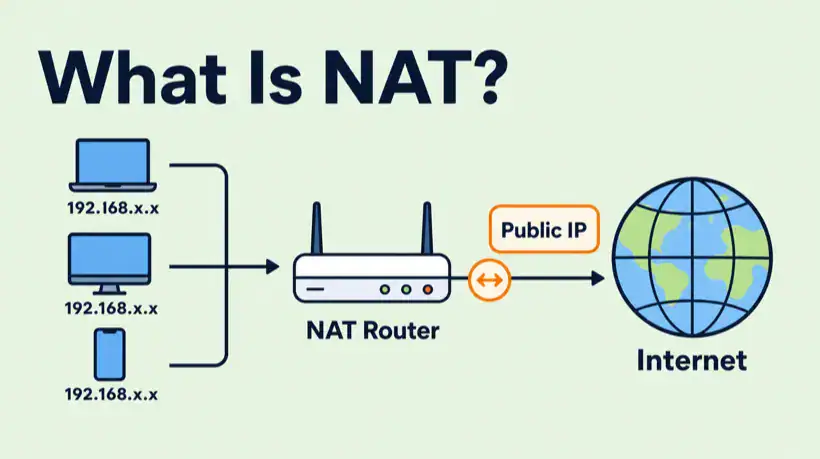
NAT is one of the main reasons a home network can have many private devices online while using one public internet connection. It is also the reason port forwarding, double NAT, CGNAT, VPN access, and game console NAT types can feel confusing.
If you understand what NAT is doing, a lot of everyday networking problems become easier to reason about: why your laptop has a private IP, why your router has a WAN IP, why inbound connections need a port forward, and why CGNAT can stop a self-hosted service before it reaches your router.
Quick answer
NAT, or network address translation, is a router function that rewrites private internal IP addresses and ports into a public-facing address so many devices can share one internet connection. It is useful because it conserves public IPv4 addresses and lets home devices use private ranges like 192.168.x.x, but it also means unsolicited inbound traffic needs a matching state entry or a port forwarding rule to reach a device inside the network.
Related troubleshooting paths: if inbound access is failing, use the port forwarding not working checklist. If there are two routers translating traffic, read Double NAT Explained. If your ISP is doing the translation upstream, compare it with the CGNAT section in the Double NAT guide.
What NAT does
Most home networks use private IP addresses internally. Your laptop might be 192.168.1.23, your phone might be 192.168.1.42, and your printer might be 192.168.1.80. Those addresses are useful inside your LAN, but they are not globally routed on the public internet.
When your laptop opens a website, your router changes the packet source from the laptop’s private address to the router’s public-facing WAN address. It also records a translation entry so the reply can be mapped back to the right internal device.
In plain English, NAT keeps a temporary lookup table: this internal device and port started this conversation, so replies for that public-side port should go back to that internal device.
A simple NAT example
Imagine three devices behind one router:
| Device | Private IP | Public path |
|---|---|---|
| Laptop | 192.168.1.20 | Shares router public IP |
| Phone | 192.168.1.21 | Shares router public IP |
| Game console | 192.168.1.22 | Shares router public IP |
All three devices can browse the internet at the same time. The router keeps track of which outbound connection belongs to which internal device, then sends replies back to the correct place.
That outbound flow usually feels automatic. The complexity appears when something on the public internet tries to start the connection first.
Why NAT affects port forwarding
NAT is stateful. If an internal device starts a connection, replies are allowed back through the translation entry. If an outside client starts a new inbound connection, the router does not automatically know which internal device should receive it.
That is why port forwarding exists. A port forwarding rule tells the router:
- When traffic arrives on this public TCP or UDP port,
- send it to this internal IP address,
- on this internal port,
- using this protocol.
If the service is not listening, the host firewall blocks it, the wrong protocol is forwarded, or the router is not actually holding the public IP, the port forward will still fail.
NAT vs PAT
People often say NAT when they really mean PAT, or port address translation. In home networking, that distinction usually does not matter day to day, but it helps explain how many devices can share one public IP at the same time.
| Term | Meaning | Home network example |
|---|---|---|
| NAT | Translates one IP address to another | Private LAN address to public WAN address |
| PAT | Translates addresses and ports | Many devices share one public IP by using different public-side ports |
Most consumer routers use PAT-style behavior for outbound internet access, even if the interface simply calls it NAT.
Common NAT types
The exact terminology changes by vendor, but these are the common patterns you will see.
| NAT type | What it means | Where you see it |
|---|---|---|
| Source NAT | Changes the source address for outbound traffic | Normal home internet browsing |
| Destination NAT | Changes the destination for inbound traffic | Port forwarding to a server |
| Static NAT | Maps one address to another fixed address | Business or lab networks |
| Carrier-grade NAT | ISP shares public IPv4 addresses across many customers | Mobile broadband, fixed wireless, some residential plans |
Private IP ranges NAT commonly uses
Private IPv4 ranges are defined for internal networks. The most common home range is 192.168.0.0/16, but you may also see 10.0.0.0/8 or 172.16.0.0/12.
| Range | Common use |
|---|---|
| 10.0.0.0 to 10.255.255.255 | Enterprise, labs, VPNs, larger networks |
| 172.16.0.0 to 172.31.255.255 | Business networks, containers, internal routing |
| 192.168.0.0 to 192.168.255.255 | Home routers and small networks |
| 100.64.0.0 to 100.127.255.255 | Shared address space often used by CGNAT |
If your router’s WAN address is private or in the 100.64.0.0/10 shared space, your router may not be directly reachable from the public internet.
NAT, double NAT, and CGNAT
These three terms are easy to mix up:
- NAT: one router translates traffic between your LAN and the internet.
- Double NAT: two local devices translate traffic, such as an ISP gateway plus your own router.
- CGNAT: the ISP translates traffic upstream before it reaches your router.
The fix depends on which one you have. Normal NAT is expected. Double NAT can often be fixed with bridge mode, IP passthrough, an upstream DMZ, or matching forwards on both routers. CGNAT usually needs an ISP-provided public IP, static IP, IPv6, or a tunnel-style workaround.
How to check whether NAT is causing your problem
Use this short checklist before changing router settings:
- Find your router WAN or internet IP address.
- Compare it with your public IP from
ifconfig.meoricanhazip.com. - If they match, your router likely has the public IPv4.
- If they do not match, look for another router, modem/router, building network, or ISP NAT upstream.
- If the WAN IP is
100.64.x.xto100.127.x.x, suspect CGNAT. - If the WAN IP is
192.168.x.x,10.x.x.x, or172.16-31.x.x, suspect private upstream NAT or double NAT.
From there, move to the specific guide for the symptom you are seeing. Port forwarding failures, double NAT, and VPN route issues need slightly different checks.
Does IPv6 remove the need for NAT?
IPv6 was designed with a much larger address space, so networks do not need NAT in the same way IPv4 networks do. In a clean IPv6 setup, devices can have globally routable addresses and a firewall controls what is reachable.
In practice, many home and small business networks still run IPv4 NAT because IPv4 remains widely used. You may also have IPv6 for some traffic and IPv4 NAT for other traffic at the same time.
FAQ
What does NAT stand for?
NAT stands for network address translation. It is the process of rewriting IP address information as traffic passes through a router or firewall.
Why do home routers use NAT?
Home routers use NAT so multiple private devices can share one public IPv4 connection. Without NAT, every device would need its own public IPv4 address or a different addressing model.
Is NAT a firewall?
No. NAT is not the same as a firewall, although consumer routers often combine NAT and firewall behavior. NAT translates addresses; a firewall decides what traffic is allowed or blocked.
Can NAT break gaming or voice chat?
Yes. Strict NAT, double NAT, blocked ports, or CGNAT can make peer-to-peer gaming, matchmaking, and voice chat less reliable. Some platforms work around this automatically, while others need UPnP, port forwarding, or a different network path.
Can I turn NAT off?
You usually should not turn NAT off on a normal home router unless another device is doing routing properly or your ISP has given you a routed address block. If you are fixing double NAT, bridge the upstream device rather than disabling NAT randomly.
Final thoughts
NAT is normal on most IPv4 home networks. It lets private devices share one public internet connection, but it also changes how inbound traffic, port forwarding, VPNs, and self-hosted services work.
When something cannot be reached from outside your network, do not guess. Check the service, host firewall, router WAN IP, public IP, NAT layer, and ISP path in order. The translation layer tells you which fix is actually possible.
NAT traversal is handled for you by mesh VPNs like Tailscale, which can be a simpler fix than chasing port forwarding rules — see Tailscale vs WireGuard.
Sources and useful references
- RFC 1918: Address Allocation for Private Internets
- RFC 6598: Shared Address Space for Carrier-Grade NAT
- Cisco: How NAT Works
Get notified whenever I post something new. No spam, and it helps a lot!


Leave a Reply