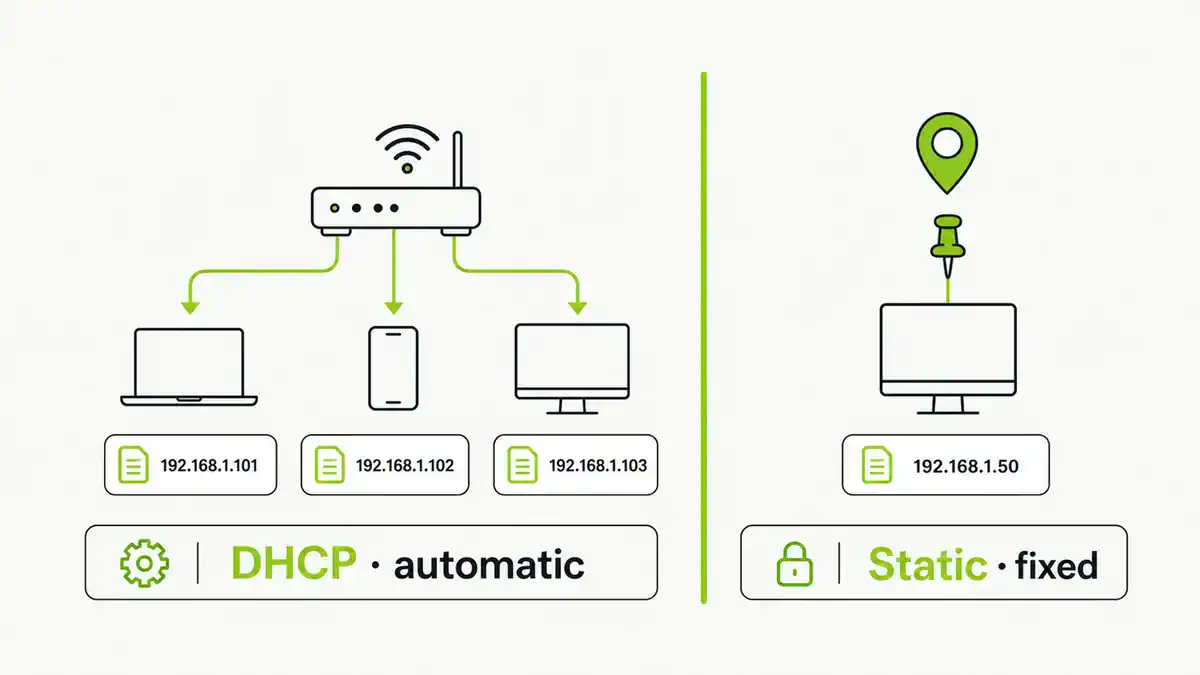
Updated June 2026. DHCP hands out IP addresses automatically; a static IP is one you set by hand that never changes. Most devices are fine on DHCP, but a few — servers, Pi-hole, printers, anything you port-forward — need a stable address. Here is when to use each, and the trick that gives you both.
Quick answer
Leave everyday devices (phones, laptops) on DHCP — it is automatic and avoids conflicts. Give a fixed address to anything other devices need to find reliably: a Pi-hole or DNS server, a NAS, a printer, or any device behind a port-forward. The best method is usually a DHCP reservation on your router, which pins an address to a device while keeping management central.
DHCP vs static IP
| DHCP | Static IP | |
|---|---|---|
| How | Router assigns automatically | You set it manually |
| Best for | Phones, laptops, most devices | Servers, Pi-hole, printers, port forwards |
| Effort | None | Manual, must avoid conflicts |
| Risk | Address can change | Conflicts if outside the safe range |
The best of both: DHCP reservation
A DHCP reservation (also called a static lease) tells the router to always give a specific device the same address, based on its MAC. You get a stable IP without configuring the device or risking conflicts, and it is managed in one place. For most home setups this beats a hand-set static IP.
How to set a fixed address
- Find the device’s MAC address (in its network settings or the router’s client list).
- In the router admin, open DHCP reservations (sometimes “address reservation”).
- Bind the MAC to an address inside your subnet but ideally outside the main DHCP pool.
- Reconnect the device so it picks up the reserved address.
- For a true device-side static IP, set the address, subnet, gateway, and DNS manually instead.
FAQ
Should I use DHCP or a static IP?
Use DHCP for everyday devices and a fixed address only for things others must find reliably, like a Pi-hole, server, printer, or a device you port-forward. A DHCP reservation is usually the cleanest way to fix an address.
What is a DHCP reservation?
A router setting that always assigns the same IP to a specific device by its MAC address. It gives you a stable address without manual device configuration or conflicts.
Does Pi-hole need a static IP?
Yes. Because devices point their DNS at it, a Pi-hole’s address must never change. Use a static IP or a DHCP reservation.
Can a static IP cause problems?
Yes, if it falls inside the DHCP pool or duplicates another device, causing conflicts. Reservations avoid this by letting the router manage the assignment.
Does a static IP make my internet faster?
No. It only fixes the local address of a device. It does not affect speed; its value is reliability for services that must be found at a known address.
Sources checked
Final take
Keep it simple: DHCP for almost everything, a reserved or static address for the handful of devices that need to be found reliably. Reservations give you stability without the conflict risk of hand-set statics. If you are fixing an address so a service is reachable from outside, pair this with port forwarding and how NAT works.
Get notified whenever I post something new. No spam, and it helps a lot!


Leave a Reply