Updated June 2026. DNS is the internet’s address book: it turns names like example.com into the IP addresses computers actually use. It feels instant, but a lot happens in those milliseconds. Here is the whole process in plain English — useful whether you are curious or troubleshooting.
Quick answer
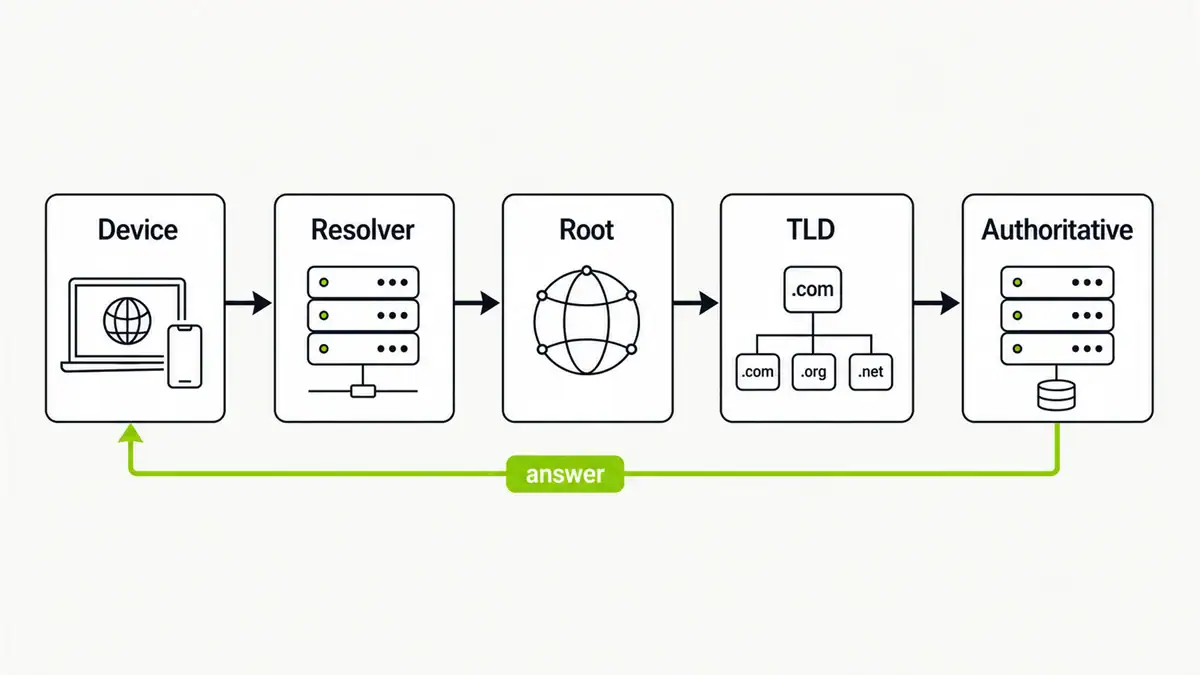
When you visit a site, your device asks a resolver for the IP. If it is not cached, the resolver walks the hierarchy: it asks a root server which TLD server handles .com, asks that TLD server which authoritative server handles the domain, and asks that server for the record. The answer is cached along the way so the next lookup is instant. That is the difference between a recursive resolver (does the walking for you) and authoritative servers (hold the real records).
The lookup, step by step
- Your device asks its configured resolver (your ISP, a public DNS, or a local one like Pi-hole).
- If the resolver has the answer cached, it returns it immediately.
- Otherwise it asks a root server, which points it to the right TLD server (.com, .org, .net).
- The TLD server points it to the domain’s authoritative name servers.
- The authoritative server returns the record (for example the A record IP).
- The resolver caches the answer for its TTL and hands it back to your device.
Common DNS records
| Record | What it does |
|---|---|
| A | Maps a name to an IPv4 address |
| AAAA | Maps a name to an IPv6 address |
| CNAME | Points one name at another name |
| MX | Directs email to mail servers |
| TXT | Holds text, e.g. SPF and verification |
| NS | Lists the authoritative name servers |
Caching and TTL
Every record has a time-to-live (TTL) that controls how long resolvers cache it. Caching is why the second visit to a site resolves instantly, and why DNS changes can take time to propagate. When cached data goes stale, you flush the DNS cache to force a fresh lookup.
Recursive vs forwarding
Most home setups forward queries to a public resolver that does the recursion. You can instead run your own recursive resolver so no third party sees your full history — see Pi-hole with Unbound. To choose an upstream, see the best public DNS providers.
FAQ
What is a DNS resolver?
A resolver is the server that answers your device’s DNS queries, either from its cache or by walking the DNS hierarchy from root to authoritative servers. Your ISP, a public DNS, or a local Pi-hole can be your resolver.
A recursive resolver does the lookup work on your behalf, querying other servers until it has an answer. Authoritative servers hold the actual records for a domain and give definitive answers.
Why do DNS changes take time?
Because resolvers cache records for their TTL. Until the TTL expires, they keep serving the old answer, so changes propagate gradually rather than instantly.
What is a TTL in DNS?
Time-to-live is how long a record may be cached before a resolver must look it up again. Lower TTLs propagate changes faster but generate more lookups.
Does DNS affect privacy?
Yes. Your resolver sees every domain you look up, and plain DNS is unencrypted. Using a trusted resolver plus DNS over HTTPS, or running your own recursive resolver, improves privacy.
Sources checked
- Cloudflare Learning — what is DNS
- RFC 1034 — Domain names, concepts and facilities
- IANA — root servers
Final take
DNS is a cache-friendly hierarchy that turns names into addresses in milliseconds. Once you can picture the resolver-to-root-to-authoritative walk, DNS problems get much easier to diagnose — start with DNS server not responding or DNS_PROBE_FINISHED_NXDOMAIN when things break.
Get notified whenever I post something new. No spam, and it helps a lot!


Leave a Reply