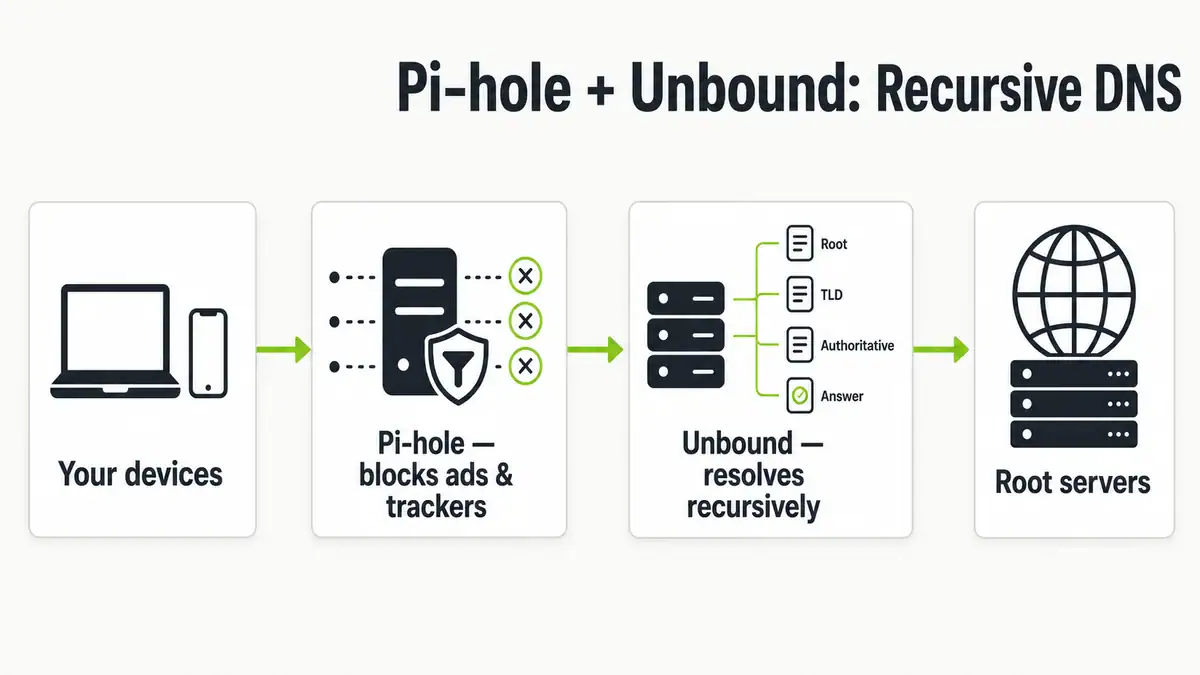
Updated June 2026. Pairing Pi-hole with Unbound turns your Pi-hole into a fully recursive DNS resolver: instead of forwarding your queries to Google, Cloudflare, or your ISP, it resolves names from the DNS root servers down, so no third party sees your full query history. You keep Pi-hole’s ad and tracker blocking and add DNSSEC validation and better privacy, with no monthly cost. This guide covers the why, the exact config, and how to test it on Pi-hole v6.
Quick answer
Install Unbound on the same machine as Pi-hole, drop in the recommended config so it listens on 127.0.0.1 port 5335, then point Pi-hole’s upstream DNS at 127.0.0.1#5335 and uncheck every other upstream provider. Do not enable DNSSEC in Pi-hole — Unbound handles it. The result is a self-contained resolver: your devices ask Pi-hole, Pi-hole filters and caches, and Unbound does the recursion straight from the root servers. It is the natural next step after a standard Pi-hole install.
Forwarding vs recursive DNS
Out of the box, Pi-hole forwards queries to an upstream resolver you choose. That works well — see the best public DNS providers — but it means that upstream provider sees every domain you look up. A recursive resolver like Unbound answers queries itself by walking the DNS hierarchy, so there is no single upstream logging your activity.
| Forwarding (default) | Recursive (Unbound) | |
|---|---|---|
| Who resolves names | An upstream provider (Cloudflare, Google, ISP) | Your own server, from the root down |
| Privacy | Upstream sees all your queries | No single third party sees them |
| DNSSEC | Depends on upstream | Validated locally by Unbound |
| First-query speed | Often faster (big shared cache) | Slightly slower until your cache warms |
| Dependency | Trust in the upstream | Self-contained, no external resolver |
| Setup effort | None | One package + one config file |
Neither is strictly “better.” Recursive wins on privacy and independence; forwarding wins on raw first-lookup speed because providers run enormous shared caches. Many home labs run Unbound for the privacy and accept a few milliseconds more on cache misses.
Step 1: Install Unbound
On your Pi-hole host (Debian, Raspberry Pi OS, or Ubuntu):
sudo apt update
sudo apt install unbound
The dns-root-data package is pulled in as a dependency, so Unbound finds the root server hints automatically — you do not need to download them manually.
Step 2: Add the Pi-hole config
Create /etc/unbound/unbound.conf.d/pi-hole.conf with the recommended settings:
server:
    # If no logfile is specified, syslog is used
    verbosity: 0

    interface: 127.0.0.1
    port: 5335
    do-ip4: yes
    do-udp: yes
    do-tcp: yes

    # May be set to no if you don't have IPv6 connectivity
    do-ip6: no

    # You want to leave this to no unless you have native IPv6
    prefer-ip6: no

    # Trust glue only if it is within the server's authority
    harden-glue: yes

    # Require DNSSEC data for trust-anchored zones
    harden-dnssec-stripped: yes

    # Don't use capitalization randomization (known DNSSEC issues)
    use-caps-for-id: no

    # Reduce EDNS reassembly buffer size (DNS Flag Day 2020)
    edns-buffer-size: 1232

    # Prefetch close-to-expired cache entries
    prefetch: yes

    # One thread is enough for most home networks
    num-threads: 1

    # Larger kernel buffer for traffic spikes
    so-rcvbuf: 1m

    # Keep local IP ranges private
    private-address: 192.168.0.0/16
    private-address: 169.254.0.0/16
    private-address: 172.16.0.0/12
    private-address: 10.0.0.0/8
    private-address: fd00::/8
    private-address: fe80::/10
Restart Unbound to load it:
sudo systemctl restart unbound
sudo systemctl status unbound
On Debian Bullseye and newer, disable the helper that can clash with your config:
sudo systemctl disable --now unbound-resolvconf.serviceStep 3: Test Unbound directly
Before touching Pi-hole, confirm Unbound resolves and validates DNSSEC on port 5335:
# Should resolve normally
dig pi-hole.net @127.0.0.1 -p 5335

# Should return SERVFAIL (bad DNSSEC, correctly rejected)
dig fail01.dnssec.works @127.0.0.1 -p 5335

# Should return NOERROR with the "ad" flag set (validated)
dig +ad dnssec.works @127.0.0.1 -p 5335
If the first and third queries succeed and the middle one returns SERVFAIL, DNSSEC validation is working.
Step 4: Point Pi-hole at Unbound
In the Pi-hole v6 admin UI, go to Settings > DNS. Uncheck every pre-configured upstream provider, then under Custom DNS servers add:
127.0.0.1#5335The #5335 tells Pi-hole to send queries to Unbound’s port. Leave Use DNSSEC unchecked in Pi-hole — Unbound already validates it, and enabling it in both places causes duplicate work and occasional failures. Save, and your devices now run through Pi-hole → Unbound → the root servers.
Troubleshooting
- No resolution after switching upstream. Make sure Unbound is actually listening:
sudo ss -tulpn | grep 5335. If nothing is bound, re-check the config file path and runsudo systemctl status unboundfor errors. - Everything returns SERVFAIL. The system clock is wrong (DNSSEC is time-sensitive) or you left DNSSEC enabled in Pi-hole too. Fix the clock with
timedatectland uncheck DNSSEC in Pi-hole. - Port 5335 already in use / won’t start. Another resolver (often systemd-resolved or the unbound-resolvconf helper) is interfering. Disable
unbound-resolvconf.serviceas shown above. - Queries still leaking to an old provider. You left an upstream checkbox enabled. Any active forwarder alongside Unbound defeats the purpose — only
127.0.0.1#5335should remain. - Stale results after the change. Flush your DNS cache on the client and test again. If names still fail, work through DNS server not responding.
FAQ
Is Pi-hole with Unbound faster?
Not usually for the first lookup of a domain, because public resolvers have huge shared caches. After your local cache warms up, repeat queries are very fast. People run Unbound mainly for privacy and independence, not raw speed.
Do I still need a public DNS provider?
No. With Unbound as a recursive resolver, you no longer forward to Cloudflare, Google, or your ISP — that is the point. Remove all upstream providers in Pi-hole and use only 127.0.0.1#5335.
Should I enable DNSSEC in Pi-hole?
No. Unbound validates DNSSEC itself. Enabling it in Pi-hole as well is redundant and can cause resolution failures. Leave it off in the Pi-hole UI.
Does this work with AdGuard Home?
Yes, AdGuard Home can also use Unbound as an upstream, or run its own recursive mode. If you are still choosing between them, see Pi-hole vs AdGuard Home.
Will ad blocking still work?
Yes. Pi-hole still filters using your blocklists before queries ever reach Unbound, so nothing changes there. Keep your lists tuned with the best 2026 Pi-hole blocklists.
Sources checked
- Pi-hole documentation — Unbound guide (config and test commands)
- Pi-hole v6 documentation (Settings > DNS, custom upstream)
- NLnet Labs — Unbound documentation (recursive resolution and DNSSEC)
Final take
Pi-hole plus Unbound is the cleanest way to own your DNS end to end: Pi-hole blocks ads and trackers, Unbound resolves and validates everything locally, and no third party sees your full query history. It is a one-package, one-config-file change on top of a normal Pi-hole install, and it pairs perfectly with good blocklists. If you have not set up Pi-hole yet, start with how to install and configure Pi-hole on Raspberry Pi OS, then come back and add Unbound. If your goal is privacy rather than local resolution, DNS over HTTPS is the other route to encrypted lookups.
Get notified whenever I post something new. No spam, and it helps a lot!


Leave a Reply