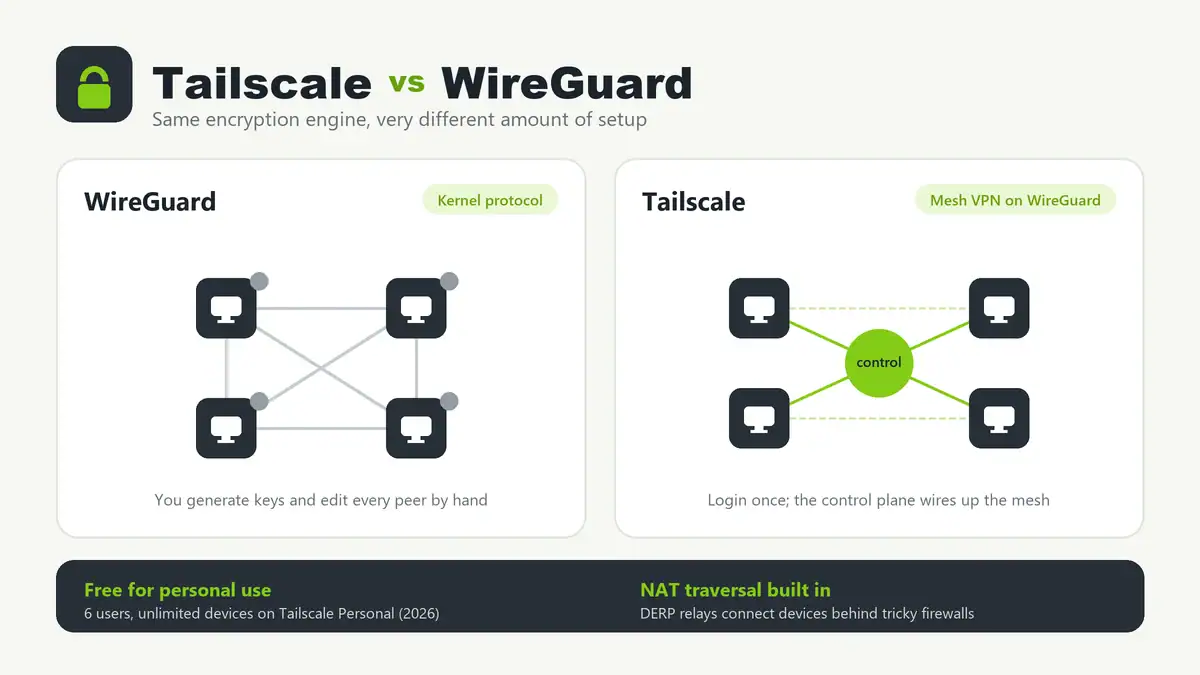
Updated June 2026. Tailscale and WireGuard are not really rivals: Tailscale is built on top of WireGuard. WireGuard is the fast, modern encryption protocol that moves your packets; Tailscale is a managed control plane that wraps WireGuard with automatic key exchange, NAT traversal, and device management. So the real question is not “which is faster” but “how much of the VPN do you want to run yourself.” For most home labs and small teams, Tailscale is the quickest path to a working mesh. If you want full control, no third-party coordination server, and a single tunnel you fully own, raw WireGuard wins.
Quick answer
Use Tailscale if you want to connect many devices across different networks and NATs with almost no configuration, get MagicDNS and access controls for free, and never touch a port-forward rule. Use raw WireGuard if you want a minimal, self-hosted, fully owned tunnel, you are comfortable generating keys and editing config files, and you do not want to depend on an external coordination service. Performance is effectively the same for home use because Tailscale is WireGuard under the hood — a direct WireGuard tunnel is marginally faster in ideal conditions, but both easily saturate a typical home connection.
Tailscale vs WireGuard at a glance
| Factor | WireGuard | Tailscale |
|---|---|---|
| What it is | A VPN protocol (in the Linux kernel since 5.6) | A mesh VPN service built on WireGuard |
| Setup | Generate keys, edit config, set up each peer by hand | Install, log in with SSO, devices join automatically |
| NAT / firewall traversal | You usually need a port forward or a public endpoint | Automatic, via DERP relays and hole punching |
| Topology | Point-to-point or hub-and-spoke you build yourself | Full mesh, managed for you |
| Key management | Manual, including rotation | Automatic key rotation and distribution |
| DNS | Bring your own | MagicDNS built in |
| Access control | Firewall rules / AllowedIPs | ACL policy file, identity-based |
| Self-hosting | Fully self-hosted by design | Cloud control plane (or self-host with Headscale) |
| Best fit | Single tunnel, full control, minimalists | Many devices, many networks, low effort |
How they actually differ
WireGuard is deliberately tiny. It does one thing: create a fast, encrypted tunnel between peers that hold each other’s public keys. There is no concept of “logging in,” no automatic discovery, and no NAT traversal. You decide the topology, you distribute the keys, and you make sure each peer can actually reach the others — which on home connections usually means a port forward or a cloud VPS with a public IP. That simplicity is the appeal: fewer moving parts, nothing phoning home, and a config you can read top to bottom.
Tailscale keeps the WireGuard data plane but adds the parts that are tedious to build yourself. A coordination server tracks which devices belong to your network (your “tailnet”), hands out and rotates keys, and helps peers find each other. When two devices are behind restrictive NATs and cannot connect directly, traffic falls back to an encrypted DERP relay so the connection still works. This is why Tailscale “just connects” across double NAT, CGNAT, and hotel Wi-Fi where a hand-rolled WireGuard tunnel would need extra work. If you want the Tailscale experience without the hosted control plane, the open-source Headscale server lets you self-host it.
Pricing in 2026
WireGuard is free and open source — your only costs are the hardware and any VPS you use as an endpoint. Tailscale overhauled its plans in April 2026. The Personal plan is free and now covers up to 6 users with unlimited devices, which comfortably handles most home labs. Paid tiers start at Standard ($8 per user/month) and Premium ($18 per user/month), with Enterprise pricing on request; those add things like SCIM provisioning, more ACL groups, and advanced access controls. Always confirm current numbers on Tailscale’s pricing page before you plan a deployment.
How to set up each one
Tailscale (fastest path)
On Linux, install and bring the node online, then repeat on every device:
curl -fsSL https://tailscale.com/install.sh | sh
sudo tailscale up
tailscale ip -4
tailscale status
Log in with the link it prints, and the device joins your tailnet. Every other device you log in with the same identity can now reach it by its Tailscale IP or MagicDNS name. To share your home subnet with the tailnet, advertise routes with sudo tailscale up --advertise-routes=192.168.1.0/24 and approve them in the admin console.
WireGuard (full control)
Generate a key pair on each peer, then write a config. A minimal client looks like this:
wg genkey | tee privatekey | wg pubkey > publickey

# /etc/wireguard/wg0.conf
[Interface]
PrivateKey = <client-private-key>
Address = 10.10.0.2/24

[Peer]
PublicKey = <server-public-key>
Endpoint = your.public.host:51820
AllowedIPs = 10.10.0.0/24
PersistentKeepalive = 25
Bring it up with sudo wg-quick up wg0 and confirm with sudo wg show. The server needs UDP 51820 reachable, which on a home line means a port forward or a VPS endpoint. Each new peer means another key pair and another [Peer] block on both ends.
Troubleshooting
- Tunnel is up but no traffic flows. This is almost always a routing or AllowedIPs problem, not encryption. Check that
AllowedIPscovers the subnets you expect and that the far side routes back. See our walkthrough on a VPN tunnel that is up but passing no traffic. - WireGuard handshake never completes. The endpoint is unreachable — verify the public IP/port, that UDP 51820 is forwarded, and that you are not stuck behind CGNAT. If port forwarding looks right but still fails, work through port forwarding that is not working.
- Tailscale uses a relay instead of a direct connection. Run
tailscale ping <host>. If it reports a DERP path, a strict firewall is blocking direct connections; it still works, just with slightly more latency. - Names do not resolve. For Tailscale, confirm MagicDNS is enabled. For either tool, clear stale records — here is how to flush your DNS cache.
Can you use them together?
Yes, and it is a common home-lab pattern. A popular setup is running Pi-hole on a device in your tailnet and pointing Tailscale’s DNS at it, so every device gets ad-blocking DNS anywhere in the world. Pair that with solid Pi-hole blocklists and a fast upstream public DNS provider, and you have private, filtered DNS over an encrypted mesh.
FAQ
Is Tailscale just WireGuard?
Tailscale uses WireGuard as its data plane but adds a coordination server, automatic key management, NAT traversal with DERP relays, MagicDNS, and identity-based access control. You get WireGuard’s speed without configuring peers by hand.
Is WireGuard faster than Tailscale?
A direct WireGuard tunnel is marginally faster in ideal conditions because there is no coordination overhead, but the difference is negligible for home use — both saturate typical broadband. If Tailscale falls back to a DERP relay you will see extra latency, which is a connectivity issue, not a protocol limit.
Is Tailscale free?
Yes. The Personal plan is free and, as of the April 2026 pricing update, supports up to 6 users with unlimited devices. Paid plans (Standard and Premium) add team features like SCIM and advanced access controls.
Do I need to open ports for Tailscale?
No. Tailscale handles NAT traversal automatically and falls back to encrypted relays when a direct connection is not possible, so you do not need to forward ports. Raw WireGuard usually does need a reachable UDP port or a public endpoint.
Can I self-host the Tailscale control server?
Yes. Headscale is an open-source implementation of the Tailscale control server. It lets you keep the easy client experience while owning the coordination layer, at the cost of running and maintaining it yourself.
Sources checked
- Tailscale — WireGuard vs Tailscale (architecture and relationship)
- Tailscale pricing (2026 plans and Personal plan limits)
- WireGuard official site (protocol and configuration)
- How Tailscale works (coordination server and DERP relays)
- Headscale (self-hosted control server)
Final take
Reach for Tailscale when you want a mesh across phones, laptops, and servers on different networks with near-zero configuration — it is the right default for most home labs and small teams, and the free Personal plan covers it. Reach for raw WireGuard when you want a minimal, fully self-owned tunnel, you are happy managing keys and routing, and you would rather not depend on an external control plane. Since Tailscale runs on WireGuard, you are not really choosing between two protocols — you are choosing how much of the plumbing you want to manage. If you are connecting a Raspberry Pi back home, start with Tailscale, then add Pi-hole for network-wide DNS filtering across the whole tailnet.
Get notified whenever I post something new. No spam, and it helps a lot!


Leave a Reply