Updated June 2026: the best Pi-hole blocklist setup for most home networks is still a small, maintained set of quality lists rather than every list you can find. Start with a balanced list such as HaGeZi Multi Normal or OISD Big, add a threat intelligence list if you want stronger security filtering, and only move to aggressive lists when you are comfortable checking the query log and allowlisting false positives.
Pi-hole works by acting as your local DNS resolver. Your devices ask Pi-hole for a domain, Pi-hole checks gravity and your allow/deny rules, and then it either blocks the domain or forwards the request upstream. If you have not built the resolver yet, start with How to Install and Configure Pi-hole on Raspberry Pi OS. If you are still choosing between self-hosted DNS blockers, compare Pi-hole vs AdGuard Home before committing to your stack. If you decide on AdGuard Home instead, use the AdGuard Home blocklists guide. If you are choosing an upstream resolver for Pi-hole, compare options in Best Public DNS Providers for 2026.
Quick answer
For most users, use one main all-in-one blocklist, then add one or two focused security lists only if you need them. My current recommendation is HaGeZi Multi Normal for a low-maintenance Pi-hole, HaGeZi Pro for a stricter home lab or technical household, OISD Big if you want a simple low-false-positive option, and HaGeZi Ultimate only if you are prepared to troubleshoot broken apps. Keep StevenBlack as a safe baseline if you want the simplest possible setup.
Before adding blocklists
More blocklists does not automatically mean better blocking. Large overlapping lists can slow troubleshooting, create duplicate entries, and make it harder to know which list broke a site or app. Pi-hole’s gravity system consolidates subscribed lists into its database, and you can rebuild that database with pihole -g whenever you change adlists.
The clean approach is:
- Pick one main list tier.
- Add a focused threat or scam list if you want extra protection.
- Run a gravity update.
- Use the query log for a few days.
- Allowlist only the domains that are genuinely breaking things.
How to install a Pi-hole blocklist
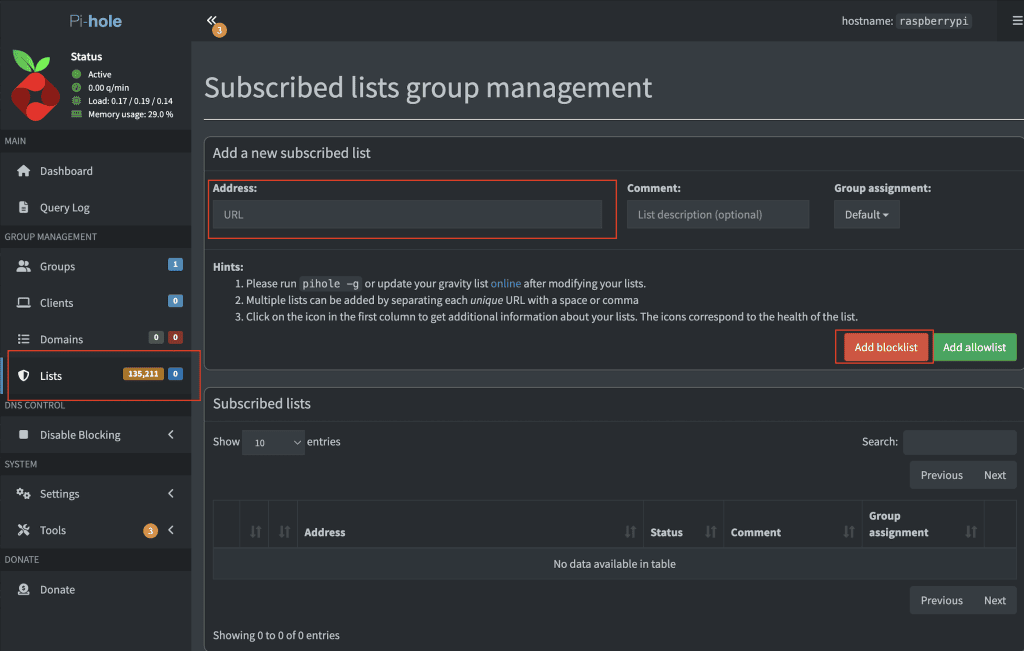
Log in to the Pi-hole web interface, go to Lists, paste the blocklist URL, and click Add blocklist. Then update gravity from the web interface or run this command over SSH:
pihole -gAfter gravity updates, test a few normal sites and a few domains you expect to be blocked. If ads still appear after the lists are loaded, use Pi-hole Not Blocking Ads to check DHCP, IPv6, browser Secure DNS, VPN DNS, gravity, allowlists, and query logs. If DNS itself stops working after a change, use the steps in DNS Server Not Responding: How to Fix It to separate a resolver problem from a blocklist problem.
Best Pi-hole blocklists for 2026
| Setup | Best for | Maintenance level | My take |
|---|---|---|---|
| HaGeZi Multi Normal | Most home networks | Low | Best starting point for blocking ads, trackers, telemetry, scam, phishing, malware, and common junk without making Pi-hole painful. |
| HaGeZi Pro | Technical users and home labs | Medium | Stronger than normal, but expect more allowlisting when apps or shopping flows misbehave. |
| OISD Big | Low false positives | Low | Good if you want a simple list that aims to avoid breakage. |
| StevenBlack hosts | Simple baseline installs | Low | Still a safe default-style list and useful for minimal Pi-hole deployments. |
| HaGeZi Ultimate | Experienced admins | High | Very strict. Use only if someone can maintain the allowlist. |
Set and forget Pi-hole blocklist setup
This is the best option when you want solid protection but do not want to spend your week allowlisting domains. It uses HaGeZi’s normal multi list, then adds focused pop-up, threat intelligence, and fake/scam coverage.
https://raw.githubusercontent.com/hagezi/dns-blocklists/main/adblock/multi.txt
https://raw.githubusercontent.com/hagezi/dns-blocklists/main/adblock/popupads.txt
https://raw.githubusercontent.com/hagezi/dns-blocklists/main/adblock/tif.txt
https://raw.githubusercontent.com/hagezi/dns-blocklists/main/adblock/fake.txt
Use this if you manage a family network, a small home lab, or a normal household where reliability matters more than maximum blocking.
Higher security with minimal allowlisting
This setup moves from HaGeZi Multi Normal to HaGeZi Pro. It is better when you care more about privacy/security coverage and you do not mind checking the query log when something breaks.
https://raw.githubusercontent.com/hagezi/dns-blocklists/main/adblock/pro.txt
https://raw.githubusercontent.com/hagezi/dns-blocklists/main/adblock/popupads.txt
https://raw.githubusercontent.com/hagezi/dns-blocklists/main/adblock/tif.txt
https://raw.githubusercontent.com/hagezi/dns-blocklists/main/adblock/fake.txt
If you see broken login pages, payment pages, smart TV apps, mobile apps, or vendor update checks, open the Pi-hole query log first. The fix is often a small allowlist entry, not deleting the whole list.
Low false positive alternative: OISD Big
If your priority is low breakage, OISD Big is a strong single-list option. It is especially useful when you are installing Pi-hole for someone else and do not want them calling you every time an app refuses to load a tracking or login domain.
https://big.oisd.nl/Do not add OISD Big and several other broad all-in-one lists blindly. Pick a strategy, test it, and keep the configuration understandable.
Maximum security: use carefully
HaGeZi Ultimate is the aggressive option. It can block more telemetry and unwanted domains, but it can also break app features, website login flows, and services that rely on third-party domains. I would only use it on a network where someone is available to maintain the allowlist.
https://raw.githubusercontent.com/hagezi/dns-blocklists/main/adblock/ultimate.txtIf you want maximum blocking with fewer surprises, start with Pro for a week. If nothing important breaks and you are comfortable reading query logs, then test Ultimate.
How to troubleshoot false positives
When a website or app breaks after adding blocklists, do this before deleting lists:
- Open the Pi-hole query log.
- Reproduce the broken website or app.
- Look for recently blocked domains from that client.
- Temporarily disable blocking for the client or allowlist one candidate domain.
- Refresh the app and confirm the fix.
- Keep the allowlist entry only if it is needed.
pihole -q example.com
pihole allow example.com
pihole -g
If all DNS lookups fail, the issue may be upstream DNS, routing, DHCP, stale cache, or Pi-hole itself. Start with How to Flush DNS Cache if only one device or browser is wrong. If Chrome reports DNS_PROBE_FINISHED_NXDOMAIN, check whether Pi-hole, a hosts file, VPN DNS, or the upstream resolver is returning the missing-name answer. If the whole resolver path is failing, the public DNS provider guide and the DNS troubleshooting checklist are better starting points than changing blocklists again.
Sources checked for this update
For this June 2026 refresh, I checked the current Pi-hole command documentation, the HaGeZi DNS blocklists repository, OISD’s Pi-hole setup guidance, and the StevenBlack hosts repository. Blocklist projects can change paths or list recommendations over time, so check the upstream project page before doing a large network-wide rollout.
FAQ
What is the best Pi-hole blocklist in 2026?
For most users, HaGeZi Multi Normal is the best starting point. It gives strong broad coverage without being as aggressive as Pro, Pro++, or Ultimate.
Should I use more than one Pi-hole blocklist?
Yes, but keep it intentional. One broad list plus one or two focused security lists is easier to maintain than ten overlapping all-in-one lists.
Does Pi-hole block YouTube ads?
Not reliably. YouTube serves many ads from the same infrastructure as video content, so DNS-level blocking is not the right tool for that job. The broader troubleshooting path is in Pi-hole Not Blocking Ads.
How often should Pi-hole update blocklists?
Pi-hole runs gravity updates automatically, but you can run pihole -g manually after adding, removing, or changing lists.
Conclusion
The best Pi-hole blocklist setup is the one you can maintain. Start with HaGeZi Multi Normal or OISD Big, use Pro if you want stronger blocking, and reserve Ultimate for networks where someone can actively manage false positives. Clean, maintained lists beat a giant pile of stale adlists.
For a complete Pi-hole setup path, build the resolver first with the Pi-hole install guide, decide whether Pi-hole or AdGuard Home fits your household better, choose an upstream resolver from the public DNS guide, then add the blocklist tier that matches how much maintenance you want. For the same style of setup on AdGuard Home, use Best AdGuard Home Blocklists for 2026. To stop forwarding to a public resolver entirely, pair Pi-hole with a local recursive resolver — see how to set up Pi-hole with Unbound.
Get notified whenever I post something new. No spam, and it helps a lot!


Leave a Reply