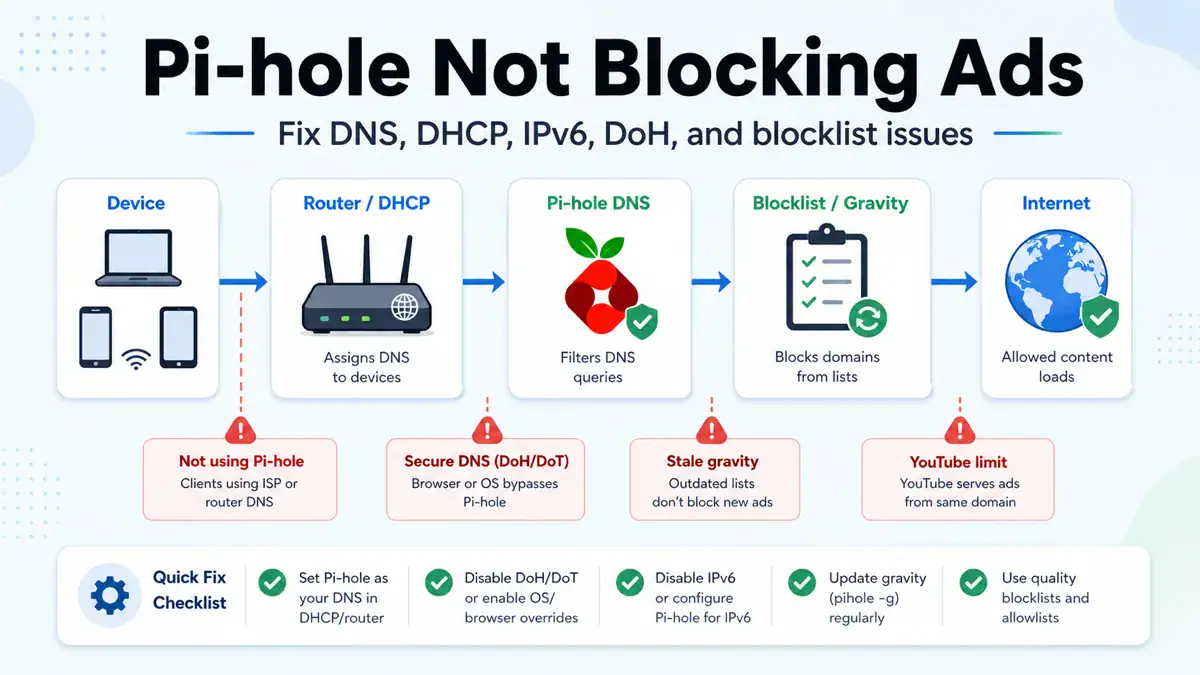
Updated June 2026: if Pi-hole is not blocking ads, do not start by adding ten more blocklists. First prove that the device is actually using Pi-hole for DNS. Most “Pi-hole not working” problems are DHCP, router DNS, IPv6 DNS, browser Secure DNS, VPN DNS, stale gravity, allowlist, or app-specific ad delivery problems.
This guide walks through the checks I use when Pi-hole looks installed correctly but ads still appear. If you are choosing lists, pair this with my Best 2026 Pi-hole Blocklists. If you are deciding whether to stay with Pi-hole or move to a different DNS blocker, read Pi-hole vs AdGuard Home first. If you have not built Pi-hole yet, start with How to Install and Configure Pi-hole on Raspberry Pi OS. If DNS itself is failing, use DNS Server Not Responding before changing blocklists.
Quick answer
Pi-hole usually stops blocking ads when your device is not using Pi-hole as DNS, your router is handing out another DNS server, IPv6 DNS bypasses Pi-hole, Chrome or another browser uses Secure DNS, a VPN overrides DNS, gravity is stale, or the domain is allowlisted. Check the Pi-hole query log first. If the device does not appear there, fix DNS routing before touching blocklists.
What Pi-hole can and cannot block
Pi-hole is a DNS blocker. It blocks domains before the device connects to them. That makes it excellent for many ad, tracker, telemetry, malware, and junk domains. It also means it cannot inspect the content inside a website or app after the connection is made.
This is why some ads still get through even with a perfect Pi-hole setup:
- YouTube and some streaming platforms serve ads from the same or changing domains as normal content.
- Apps can hardcode DNS, use encrypted DNS, or reuse first-party domains.
- Browsers can bypass system DNS with Secure DNS or DNS-over-HTTPS.
- Devices can use IPv6 DNS from the router or ISP while IPv4 uses Pi-hole.
- A domain may need to stay allowed because blocking it breaks login, checkout, or app functionality.
Start with the query log
Open the Pi-hole dashboard and check the query log while loading a page that still shows ads. This tells you which of two problems you have:
| What you see | What it means | Fix first |
|---|---|---|
| The client does not appear in the query log | The device is not using Pi-hole | Router DHCP, device DNS, IPv6 DNS, VPN, or browser Secure DNS |
| The client appears, but ad domains are allowed | Pi-hole sees the traffic but is not blocking those domains | Gravity, lists, allowlist, group assignment, or app limitations |
| The client appears and domains are blocked, but ads still show | The ad is probably first-party, cached, or not DNS-blockable | Browser cache, app cache, content blocker, or accept the Pi-hole limit |
The query log is more useful than guessing. If the device is not listed, no blocklist in the world will help because Pi-hole is not in the DNS path.
1. Make sure Pi-hole is enabled and healthy
On the Pi-hole host, check status:
pihole statusIf blocking is disabled, re-enable it:
pihole enableIf the web dashboard is reachable but DNS is not working, check the service and run a debug log before making bigger changes:
pihole debug2. Update gravity after changing lists
When you add, remove, or change adlists, update gravity so Pi-hole rebuilds the domain database:
pihole -gOn newer Pi-hole docs, the full command name is also shown as:
pihole updateGravityIf the command fails, fix that before blaming the lists. Common causes are no internet from the Pi-hole host, DNS resolution broken on the Pi-hole host itself, bad list URLs, or insufficient permissions.
3. Confirm your router gives clients Pi-hole as DNS
The cleanest home setup is usually: router handles DHCP, and DHCP tells clients to use the Pi-hole IP as DNS. If your router cannot advertise a custom DNS server, use Pi-hole’s DHCP server and disable DHCP on the router first.
Check your router DHCP settings for DNS server entries. You want clients to receive the Pi-hole IP, not your ISP DNS, not the router’s default DNS, and not a random public resolver unless you intentionally designed it that way.
| Bad DHCP design | Why ads leak | Better design |
|---|---|---|
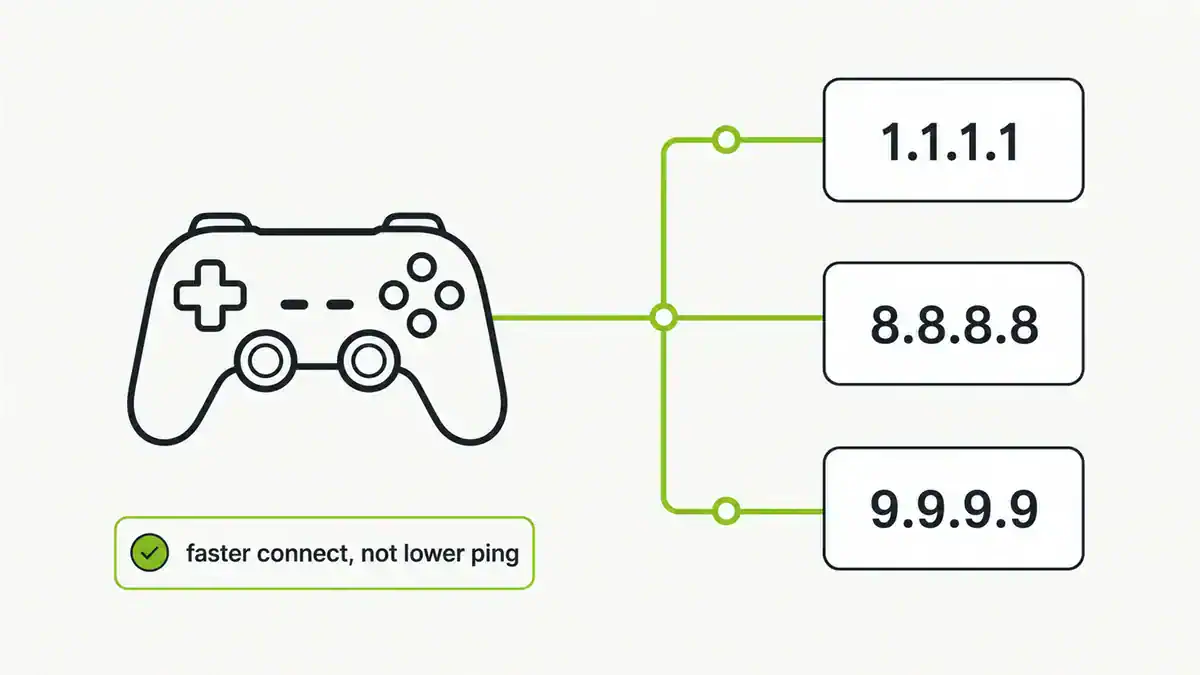
| DNS 1: Pi-hole, DNS 2: 8.8.8.8 | Clients may use Google DNS and bypass Pi-hole | Use only Pi-hole, or two Pi-hole instances |
| Router advertises itself as DNS | The router may forward to ISP DNS instead of Pi-hole | Make router forward only to Pi-hole, or advertise Pi-hole directly |
| IPv4 DNS uses Pi-hole, IPv6 DNS uses ISP | IPv6-capable clients bypass Pi-hole | Configure IPv6 DNS to Pi-hole too, or test with IPv6 disabled |
4. Renew DNS settings on the client
After changing DHCP or router DNS, devices may hold old settings until their lease renews. Reconnect Wi-Fi, reboot the device, or renew DHCP manually.
Windows
ipconfig /all
ipconfig /release
ipconfig /renew
ipconfig /flushdns
macOS
scutil --dns
sudo dscacheutil -flushcache
sudo killall -HUP mDNSResponder
Linux
resolvectl status
sudo resolvectl flush-caches
For the full cache-clearing sequence, use How to Flush DNS Cache.
5. Disable browser Secure DNS or DNS-over-HTTPS for testing
Chrome, Edge, Firefox, Brave, Android Private DNS, and some security products can send DNS to an encrypted resolver instead of your network DNS. From Pi-hole’s perspective, the device becomes invisible or only partly visible.
- In Chrome or Edge, search settings for Secure DNS and turn it off for testing.
- In Firefox, check DNS over HTTPS settings.
- On Android, check Private DNS.
- On iOS/macOS, check VPN profiles, iCloud Private Relay, and security apps.
- If an endpoint security suite controls DNS, test with its DNS protection disabled briefly.
If the query log starts showing that device after Secure DNS is disabled, the fix is policy: either keep browser-level secure DNS off on the LAN, configure your managed browser policy, or accept that those devices will bypass Pi-hole.
6. Fix IPv6 DNS leaks
IPv6 is a common reason Pi-hole appears to work sometimes but not always. A client can receive Pi-hole for IPv4 DNS and an ISP/router DNS server for IPv6. Many modern devices will happily use the IPv6 resolver.
Check whether your router advertises IPv6 DNS servers. If it does, set the IPv6 DNS server to the Pi-hole IPv6 address, disable router advertisement DNS if your router allows it, or temporarily disable IPv6 to prove the leak before making a permanent design choice.
7. Check allowlists, groups, and disabled adlists
If the client appears in the query log, but ad domains show as allowed, inspect the reason column. Common causes:
- The domain is on the allowlist.
- The adlist that would block it is disabled.
- The client belongs to a Pi-hole group without the right lists attached.
- The domain is not covered by your current list set.
- A regex or wildcard rule is too broad or too narrow.
Use Pi-hole’s query command to test a domain against your lists:
pihole query doubleclick.netIf your lists are thin or stale, do not paste every list you can find. Use a maintained list strategy. I keep my recommended tiers in Best 2026 Pi-hole Blocklists. If you would rather use a DNS blocker with a more polished built-in interface, the Pi-hole vs AdGuard Home comparison explains the trade-off.
8. Understand YouTube, streaming, and app ads
Pi-hole does not reliably block YouTube ads. The problem is not usually your setup. YouTube and some streaming apps can serve ads from domains that also serve normal content, rotate hostnames quickly, or use app logic that DNS blocklists cannot safely separate.
Use Pi-hole for what it is good at: DNS-level blocking across the network. For browser-specific ad slots, you may still need a browser content blocker. For mobile and smart TV apps, results vary by app, region, and how the app fetches ads.
9. Test with nslookup or dig
Use direct DNS tests to prove which resolver answers.
nslookup doubleclick.net
nslookup doubleclick.net 192.168.1.10
Replace 192.168.1.10 with your Pi-hole IP. On macOS or Linux:
dig doubleclick.net
dig @192.168.1.10 doubleclick.net
If the direct query to Pi-hole blocks the domain but the default query does not, your device is not using Pi-hole by default. If both queries allow it, inspect allowlists and adlists.
10. Watch for Docker, VLAN, guest Wi-Fi, and VPN edge cases
More complex networks add more places to bypass Pi-hole:
- Guest Wi-Fi may use a different DHCP scope and DNS server.
- VLAN firewall rules may block clients from reaching the Pi-hole IP.
- Docker Pi-hole needs correct ports, host networking, or published DNS ports.
- VPN clients may use VPN DNS while connected.
- Mesh routers may hand out DNS from the primary node even if the ISP router has different settings.
If your symptom is DNS failing entirely rather than ads leaking, go back to the resolver path in DNS Server Not Responding. If only one browser shows DNS errors, check DNS_PROBE_FINISHED_NXDOMAIN.
Pi-hole not blocking ads checklist
- Pi-hole status is enabled.
- Gravity updated successfully.
- The affected device appears in the query log.
- Router DHCP advertises Pi-hole as DNS.
- There is no public DNS fallback bypassing Pi-hole.
- IPv6 DNS also points to Pi-hole or is disabled for testing.
- Browser Secure DNS / DoH / Private DNS is disabled for testing.
- VPN DNS is disconnected or configured deliberately.
- Allowlist and group settings are not bypassing the block.
- You are not expecting DNS blocking to remove every YouTube or first-party app ad.
FAQ
Why is Pi-hole not blocking ads on one device?
That device is probably not using Pi-hole for DNS, or it is bypassing Pi-hole with browser Secure DNS, VPN DNS, Private DNS, manual DNS settings, or IPv6 DNS. Check whether the device appears in the Pi-hole query log.
Why is Pi-hole not blocking YouTube ads?
YouTube ads are not reliably blockable with DNS alone because ads and video content can share the same or fast-changing infrastructure. Pi-hole can still block many trackers and ad domains, but browser content blocking is usually needed for browser-based YouTube ads.
Should I use a second public DNS server as backup?
Usually no. If DHCP gives clients Pi-hole as DNS 1 and Google or Cloudflare as DNS 2, clients can bypass Pi-hole. If you want redundancy, use a second Pi-hole instance or a deliberate resolver design. My public DNS provider guide explains where upstream resolvers fit.
Do I need more blocklists?
Only after you prove the device is using Pi-hole and gravity is current. More lists will not help if DNS bypasses Pi-hole. Start with a small maintained list set, then add lists only when they solve a specific gap.
Why does Pi-hole show blocked queries but ads still appear?
The ad may be first-party, cached, served from a domain you cannot block without breaking the app, or delivered inside an app in a way DNS cannot separate. Pi-hole is working if it blocks DNS queries; it just cannot block every ad format.
Sources checked
One easy-to-miss cause: a browser with its own DNS over HTTPS (DoH) enabled bypasses Pi-hole entirely, so ads reappear in that browser even though Pi-hole looks fine.
Get notified whenever I post something new. No spam, and it helps a lot!


Leave a Reply